
Workflows
Build durable workflows with step functions and automatic retries.
Workflows
Ploy Start provides type-safe workflow handlers for building durable, multi-step processes with automatic state persistence and retries.
Setup
1. Configure Workflow Binding
Add a workflow binding to your ploy.yaml:
kind: worker
build: pnpm build
out: dist
workflow:
  ORDER_FLOW: order_processing
The key is the binding name (accessed via ctx.env), the value is the workflow function name.
You can use the expanded form to configure per-workflow retry defaults:
workflow:
  ORDER_FLOW:
    name: order_processing
    retries: 5 # Retry failed steps up to 5 times (default: 3)
2. Generate Types
pnpm typesThis creates env.d.ts with your workflow binding typed as WorkflowBinding.
Defining Workflows
Use .workflow() to define a type-safe workflow:
import { ploy, z } from "@meetploy/start";

const worker = ploy<PloyEnv>()
	.workflow(
		"order_processing",
		{
			input: z.object({
				orderId: z.string(),
				amount: z.number(),
			}),
			output: z.object({
				success: z.boolean(),
				trackingNumber: z.string(),
			}),
		},
		async (ctx) => {
			// Workflow steps...
			return { success: true, trackingNumber: "TRACK123" };
		},
	)
	.build();

export default worker;
The workflow name in .workflow() must match the value in your ploy.yaml
(e.g., "order_processing").
Workflow Context
The workflow handler receives a typed context:
interface EnhancedWorkflowContext<Env, Input> {
	input: Input; // Validated workflow input
	env: Env; // Environment bindings
	executionId: string; // Unique execution ID
	step: {
		run: (name, fn, opts?) => Promise<T>;
		sleep: (duration) => Promise<void>;
		parallel: (name, fns) => Promise<T[]>;
	};
	log: (message, data?) => void;
}
Inputs and Outputs
Every workflow has a durable execution record:
- Execution input comes from
ctx.env.ORDER_FLOW.trigger(...) - Execution output is the object returned by the workflow handler
Each ctx.step.run() can also persist step-level snapshots:
- Step input comes from the optional
inputfield in step options - Step output is the value returned by the step callback
const validation = await ctx.step.run(
	"validate",
	async () => {
		return {
			valid: true,
			orderId: ctx.input.orderId,
		};
	},
	{
		input: {
			orderId: ctx.input.orderId,
			amount: ctx.input.amount,
		},
	},
);
Only data you pass through the step input option is captured as step input.
This is useful for debugging transformed payloads, retries, and fan-out steps.
Step Functions
ctx.step.run
Execute a named step with automatic persistence:
.workflow("order_processing", {...}, async (ctx) => {
  // Step 1: Validate
  const validation = await ctx.step.run("validate", async () => {
    if (!ctx.input.orderId) {
      throw new Error("Missing orderId");
    }
    return { valid: true, orderId: ctx.input.orderId };
  });

  // Step 2: Charge payment
  const payment = await ctx.step.run("charge", async () => {
    return { paymentId: `pay_${Date.now()}`, status: "paid" };
  });

  // Step 3: Fulfill
  const fulfillment = await ctx.step.run("fulfill", async () => {
    return { trackingNumber: `TRACK_${Date.now()}` };
  });

  return {
    success: true,
    trackingNumber: fulfillment.trackingNumber
  };
})
Each step is persisted. If the workflow restarts, completed steps are skipped and their results are replayed from storage.
Step Options
Configure per-step retries and timeouts (overrides the workflow-level default):
await ctx.step.run(
	"external-api",
	async () => {
		return await callExternalAPI();
	},
	{
		retries: 5, // Retry up to 5 times (overrides ploy.yaml default)
		timeout: 30000, // Timeout after 30 seconds
	},
);
By default, each step retries up to 3 times on failure with exponential
backoff. Configure the default in ploy.yaml or override per-step with the
retries option.
ctx.step.sleep
Pause execution for a duration:
// Sleep for milliseconds
await ctx.step.sleep(5000); // 5 seconds

// Sleep for human-readable duration
await ctx.step.sleep("30s"); // 30 seconds
await ctx.step.sleep("5m"); // 5 minutes
await ctx.step.sleep("1h"); // 1 hour
Sleep is durable - the workflow state is saved and resumed after the duration.
ctx.step.parallel
Run multiple operations in parallel:
const [userResult, orderResult, inventoryResult] = await ctx.step.parallel(
	"fetch-data",
	[
		async () => await fetchUser(ctx.input.userId),
		async () => await fetchOrder(ctx.input.orderId),
		async () => await checkInventory(ctx.input.items),
	],
);
Triggering Workflows
Trigger workflows via the binding in HTTP routes:
Start Execution
.get("/workflow/trigger", {
  response: z.object({ executionId: z.string() })
}, async (ctx) => {
  const { executionId } = await ctx.env.ORDER_FLOW.trigger({
    orderId: "order-123",
    amount: 99.99
  });
  return { executionId };
})
Check Status
.get("/workflow/status/:id", {
  params: z.object({ id: z.string() }),
  response: z.object({ execution: z.unknown() })
}, async (ctx) => {
  const execution = await ctx.env.ORDER_FLOW.getExecution(ctx.params.id);
  return { execution };
})
Inspecting Executions
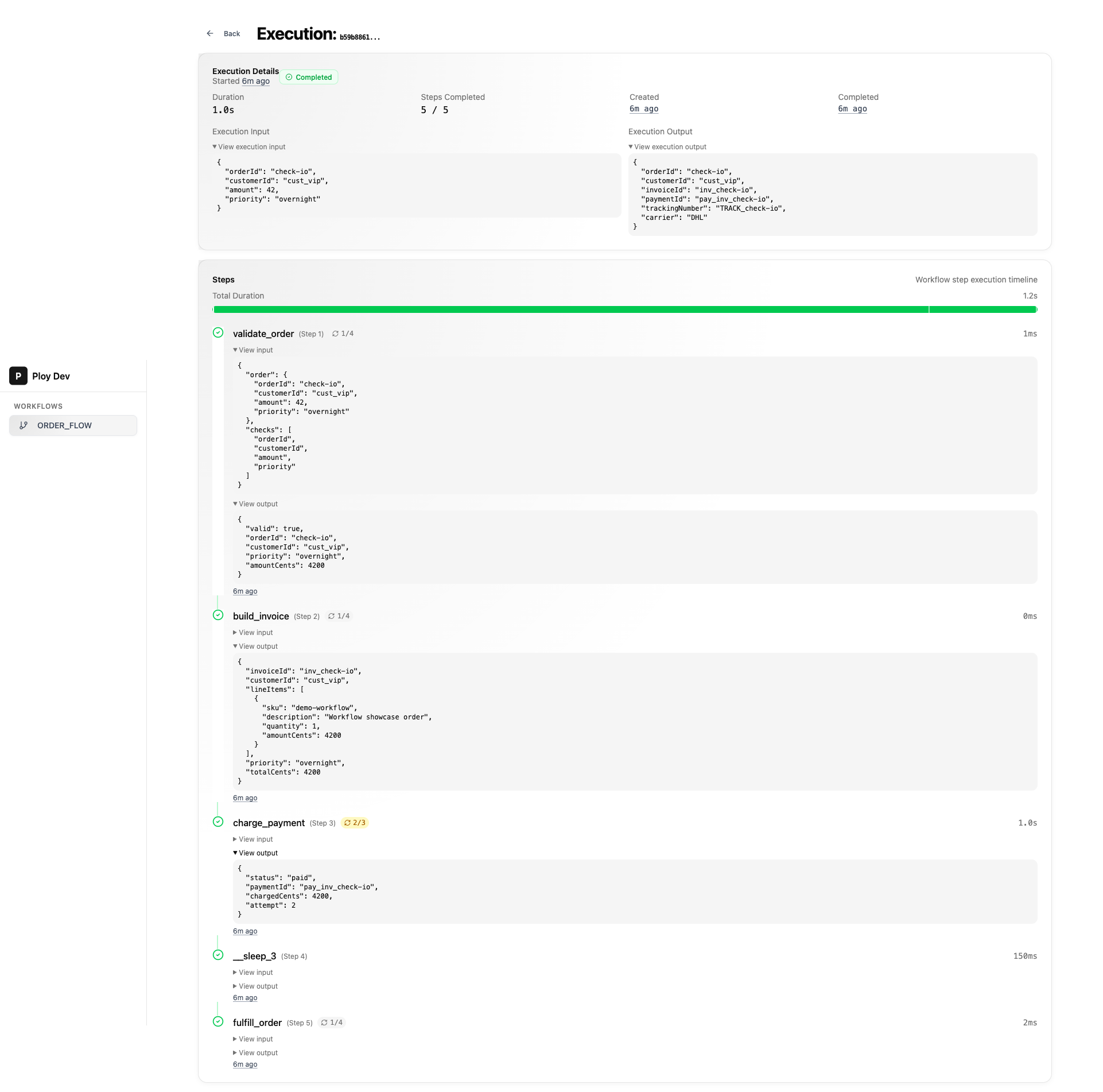
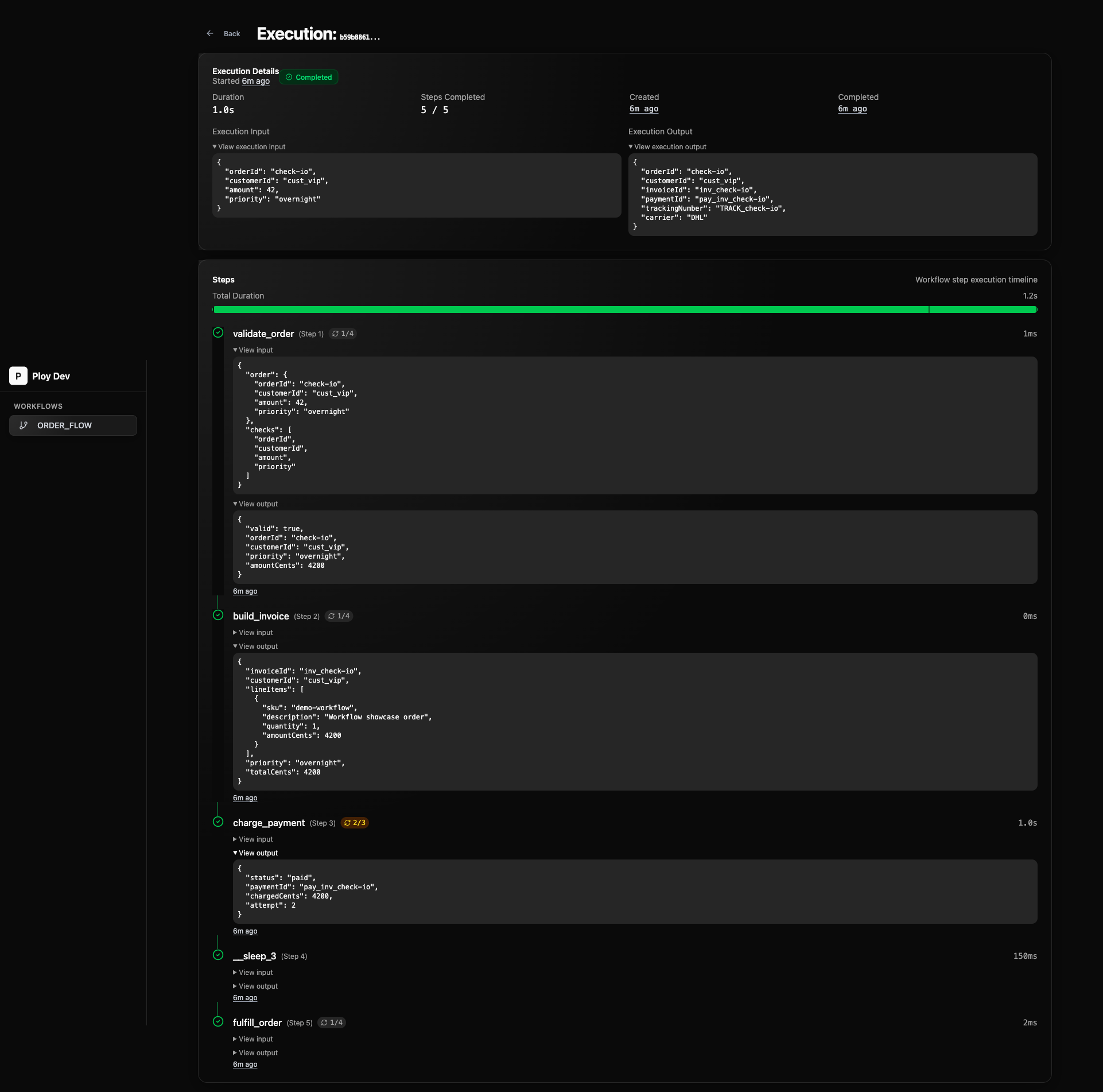
After you trigger a workflow locally, open the Ploy dashboard to inspect recent executions and step history.
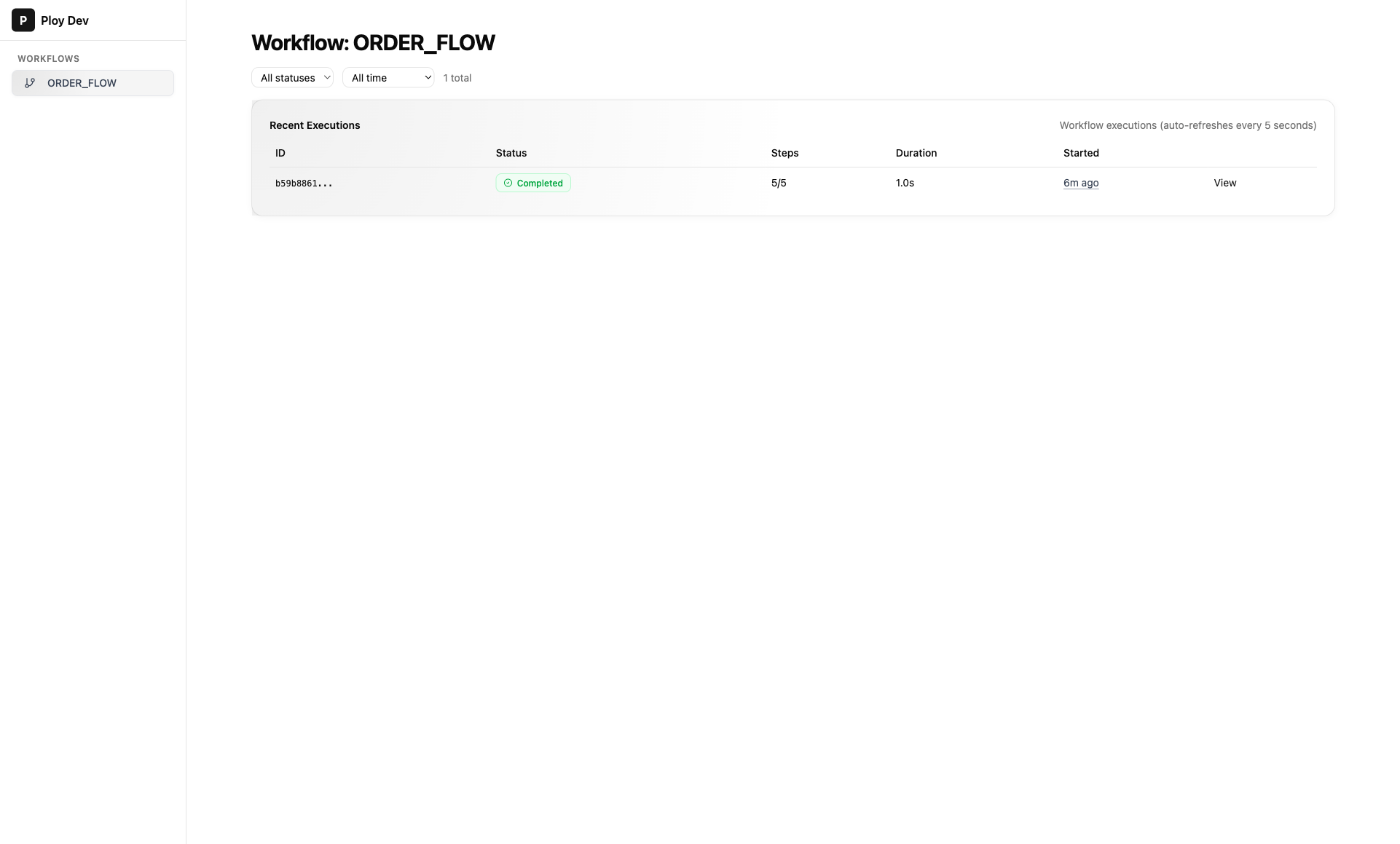
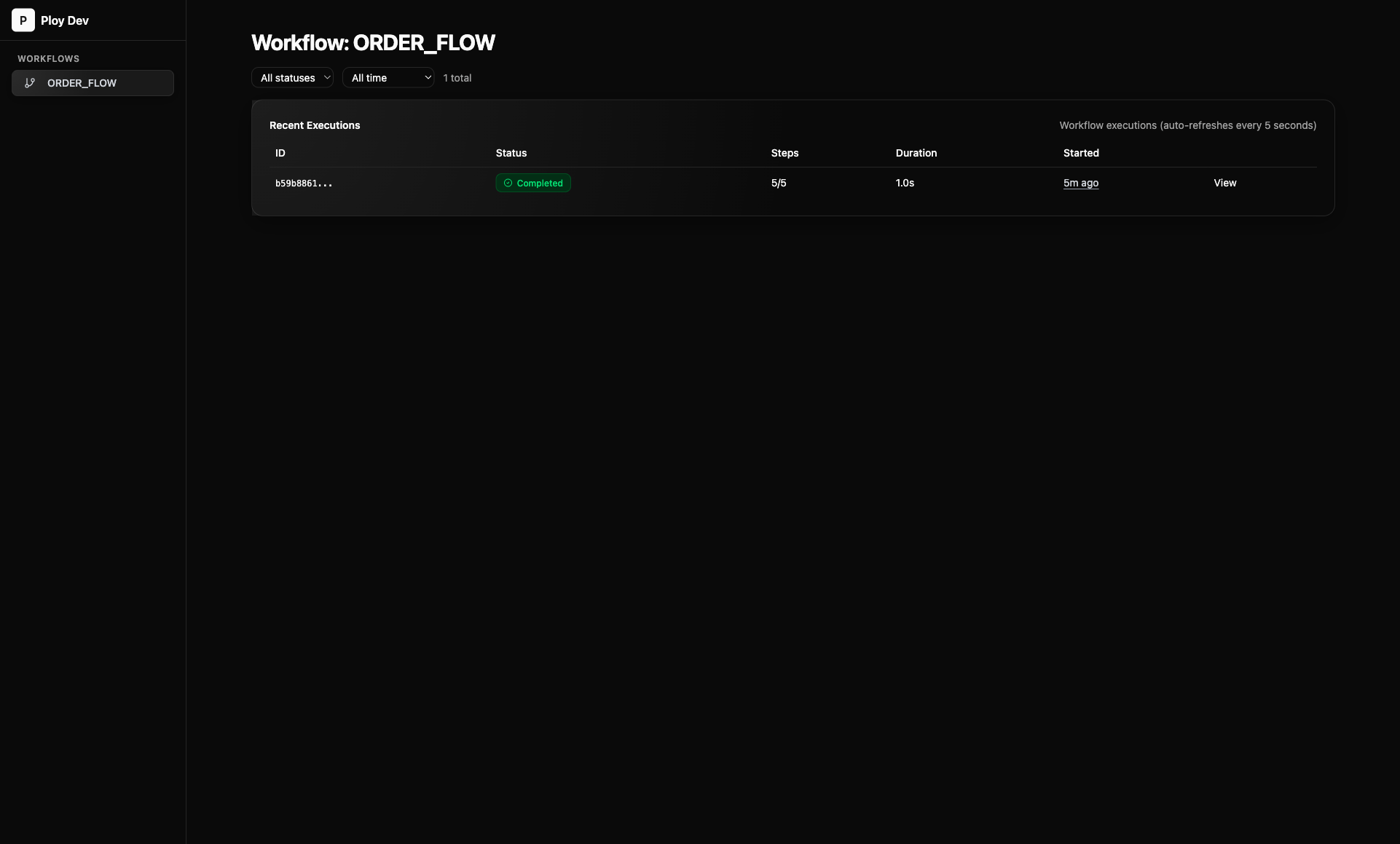
The execution detail screen shows execution input/output plus the step timeline, step inputs, step outputs, durations, and retry attempts.
In examples/workflow-simple, use /trigger for a successful execution and /trigger-failing for a run that exhausts every retry in charge_payment, so you can inspect the final failed-step state in the UI.
Cancel Execution
.get("/workflow/cancel/:id", {
  params: z.object({ id: z.string() }),
  response: z.object({ cancelled: z.boolean() })
}, async (ctx) => {
  await ctx.env.ORDER_FLOW.cancel(ctx.params.id);
  return { cancelled: true };
})
Error Handling
Handle errors in individual steps:
.workflow("order_processing", {...}, async (ctx) => {
  // Retry payment with backoff
  let payment;
  for (let attempt = 0; attempt < 3; attempt++) {
    payment = await ctx.step.run(`charge_attempt_${attempt}`, async () => {
      const result = await chargeCard(ctx.input.amount);
      if (result.status === "declined") {
        throw new Error("Payment declined");
      }
      return result;
    });

    if (payment.status === "paid") break;

    // Wait before retry
    await ctx.step.sleep(attempt * 1000);
  }

  if (!payment || payment.status !== "paid") {
    throw new Error("Payment failed after retries");
  }

  return { success: true, paymentId: payment.id };
})
Full Example
import { ploy } from "@meetploy/start";
import { z } from "zod";

const worker = ploy<PloyEnv>()
	// Trigger endpoint
	.post(
		"/orders",
		{
			body: z.object({
				userId: z.string(),
				items: z.array(
					z.object({
						productId: z.string(),
						quantity: z.number(),
						price: z.number(),
					}),
				),
			}),
			response: z.object({
				orderId: z.string(),
				executionId: z.string(),
			}),
		},
		async (ctx) => {
			const orderId = crypto.randomUUID();
			const amount = ctx.body.items.reduce(
				(sum, item) => sum + item.price * item.quantity,
				0,
			);

			const { executionId } = await ctx.env.ORDER_FLOW.trigger({
				orderId,
				userId: ctx.body.userId,
				items: ctx.body.items,
				amount,
			});

			return { orderId, executionId };
		},
	)

	// Status endpoint
	.get(
		"/orders/:id/status",
		{
			params: z.object({ id: z.string() }),
			response: z.object({
				status: z.string(),
				result: z.unknown().optional(),
			}),
		},
		async (ctx) => {
			const execution = await ctx.env.ORDER_FLOW.getExecution(ctx.params.id);
			return {
				status: execution.status,
				result: execution.result,
			};
		},
	)

	// Workflow definition
	.workflow(
		"order_processing",
		{
			input: z.object({
				orderId: z.string(),
				userId: z.string(),
				items: z.array(
					z.object({
						productId: z.string(),
						quantity: z.number(),
						price: z.number(),
					}),
				),
				amount: z.number(),
			}),
			output: z.object({
				orderId: z.string(),
				paymentId: z.string(),
				trackingNumber: z.string(),
				completedAt: z.string(),
			}),
		},
		async (ctx) => {
			ctx.log("Starting order processing", { orderId: ctx.input.orderId });

			// Step 1: Validate inventory
			const inventory = await ctx.step.run("check-inventory", async () => {
				for (const item of ctx.input.items) {
					const available = await checkStock(item.productId);
					if (available < item.quantity) {
						throw new Error(`Insufficient stock for ${item.productId}`);
					}
				}
				return { available: true };
			});

			// Step 2: Reserve inventory
			await ctx.step.run("reserve-inventory", async () => {
				for (const item of ctx.input.items) {
					await reserveStock(item.productId, item.quantity);
				}
			});

			// Step 3: Process payment with retry
			let payment;
			for (let attempt = 0; attempt < 3; attempt++) {
				payment = await ctx.step.run(`payment-attempt-${attempt}`, async () => {
					return await processPayment(ctx.input.userId, ctx.input.amount);
				});

				if (payment.status === "succeeded") break;
				await ctx.step.sleep("5s");
			}

			if (!payment || payment.status !== "succeeded") {
				// Rollback inventory reservation
				await ctx.step.run("rollback-inventory", async () => {
					for (const item of ctx.input.items) {
						await releaseStock(item.productId, item.quantity);
					}
				});
				throw new Error("Payment failed");
			}

			// Step 4: Create shipment
			const shipment = await ctx.step.run("create-shipment", async () => {
				return await createShipment(ctx.input.orderId, ctx.input.items);
			});

			// Step 5: Send confirmation email
			await ctx.step.run("send-confirmation", async () => {
				await sendEmail(ctx.input.userId, {
					subject: "Order Confirmed",
					body: `Your order ${ctx.input.orderId} is on its way!`,
				});
			});

			// Step 6: Wait and send follow-up
			await ctx.step.sleep("24h");

			await ctx.step.run("send-followup", async () => {
				await sendEmail(ctx.input.userId, {
					subject: "How was your order?",
					body: "We hope you enjoyed your purchase!",
				});
			});

			return {
				orderId: ctx.input.orderId,
				paymentId: payment.id,
				trackingNumber: shipment.trackingNumber,
				completedAt: new Date().toISOString(),
			};
		},
	)

	.build();

export default worker;
Best Practices
- Use unique step names - Each step needs a unique name for replay
- Keep steps atomic - One logical operation per step
- Handle failures gracefully - Use try/catch and implement rollback logic
- Log progress - Use
ctx.log()for debugging - Set timeouts - Prevent steps from hanging indefinitely
- Design for idempotency - Steps may be retried
How is this guide?
Last updated on